Discover the details behind Mycopunk crossplay, 4-player co-op features, weapon customization, and teaming up with friends in this sci-fi shooter.
Team up with your squad, supercharge your outrageous sci-fi weaponry, and dive headfirst into fungal chaos with Mycopunk crossplay options on your radar. Whether you are wondering how Mycopunk crossplay functions or simply want to know how the game handles multiplayer sessions with your friends, teaming up is half the battle against the mycological menace. Developed by Pigeons at Play and published by Devolver Digital, this hyper-customizable looter shooter thrusts a ramshackle crew of robot exterminators into frenetic planet-side action where cooperative play forms the core of the experience.
Understanding Multiplayer and Co-op Systems
The New Atlas Hazard Crew is built for teamwork, making multiplayer an essential component of the game's loop. Players can join forces in robust online co-op sessions to tackle dangerous missions, harvest resources, and dismantle fungal horrors piece by piece.
When configuring your online sessions, understanding the core game modes and player limits helps streamline your squad's deployment.
| Feature | Specification | Details |
|---|
| Max Squad Size | 4 Players | Optimal team configuration for standard missions |
| Game Mode | Online Co-op / PvE | Mission-based looter shooter progression |
| Platform Availability | PC (Steam) | Early Access launch transitioning to full release |
| Hub Area | Orbital Dropship | Hang out between missions and manage upgrades |
Community reports indicate that coordinating weapon upgrades and roles within your 4-player crew drastically increases survival rates against enemies that weaponize the environment.
Exploring Weapon Customization and Grid Upgrades
Surviving the fungal catastrophe requires more than just standard firepower. The game features an extensive grid-based upgrade system that lets you transform basic futuristic weaponry and power tools into devastating super-weapons.
Building an effective arsenal involves balancing offensive output, ammo efficiency, and crowd control. The table below outlines general upgrade paths available to the Hazard Crew.
| Upgrade Category | Primary Focus | Recommended Playstyle |
|---|
| Grid Expansion | Slot capacity & node linking | High versatility, experimental builds |
| Elemental Damage | Fungal burn & corrosive spread | Crowds and heavily armored targets |
| Utility Mods | Ammo drop rates & reload speed | Sustained fire in extended skirmishes |
| Power Tools | Close-quarters demolition | Aggressive front-line combatants |
According to player experience, experimenting with different grid configurations in the orbital dropship provides a fun way to test synergy among squadmates before dropping down to the surface.
System Requirements for Smooth Multiplayer Sessions
To ensure your game runs smoothly during intense 4-player firefights, you need to meet the hardware specifications outlined by the developers. Network stability is particularly important when playing online co-op with friends.
| Hardware Tier | Minimum Specs | Recommended Specs |
|---|
| Operating System | Windows 10 x64 Bit | Windows 11 x64 Bit |
| Processor | Intel Core i3-610 / AMD FX-8350 | Intel Core i7-6700K / AMD Ryzen 5 1500X |
| Memory (RAM) | 8 GB RAM | 16 GB recommended / 8 GB baseline |
| Graphics Card | GeForce GTX 960 / Radeon R9 380 | GeForce RTX 2080 / Radeon RX 5700 XT |
| Storage Space | 10 GB available space | 10 GB available SSD space |
Reviewing these system benchmarks helps prevent stuttering and lag spikes while connected to online multiplayer lobbies. You can check out more details directly on the Mycopunk Steam Store Page.
Tips for Effective Squad Coordination
Maximizing your team's efficiency during missions requires communication and strategic role distribution. Because enemies can steal dropped items and manipulate corrupted technology, careless positioning can spell disaster for your squad.
- Cover Different Angles: Assign specific sightlines during extraction and defense objectives to prevent crawlies from flanking your team.
- Manage Loot Recovery: Keep an eye out for enemies attempting to scavenge drops left behind in the chaos.
- Utilize the Dropship: Spend downtime in the orbital dropship to talk with Roachard Cox, test out gear combinations, and plan your next drop.
Adopting these tactical habits keeps your robot squad functional and profitable under SAXON corporation guidelines.
Frequently Asked Questions
Does Mycopunk support crossplay between different platforms?
Currently, Mycopunk is primarily available on PC via Steam, so crossplay implementation depends on future platform expansions and developer updates. Check official announcements for the latest multiplayer feature additions.
How many players can join a single co-op session?
The game supports up to 4 players in online co-op, allowing you and three friends to form the ultimate extermination squad against the fungal menace.
Can I play Mycopunk in single-player mode?
Yes, the game fully supports solo play for players who prefer tackling planet-side missions and building custom super-weapons entirely on their own terms.

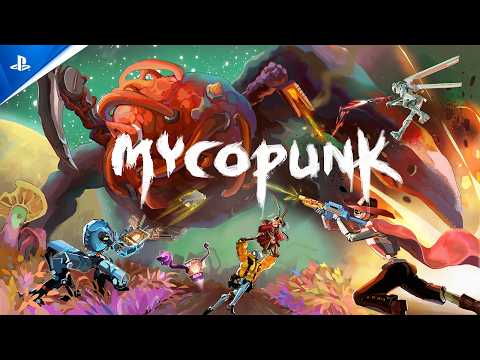 Official mediaDiscover the details behind Mycopunk crossplay, 4-player co-op features, weapon customization, and teaming up with friends in this sci-fi shooter.YouTube